HubSpot Service Hub comparison | Updated August 2026

HubSpot Service Hub vs Hesk

Looking for a HubSpot Service Hub alternative? Hesk may be a better fit when your team needs a dependable help desk without adopting a full CRM platform. HubSpot is the stronger choice when support must share customer data, automation and reporting with sales, marketing and customer success.

  • Free self-hosted option
  • Flat Hesk Cloud pricing
  • Knowledge base included
21+ years Hesk development since 2005
1,000,000+ Hesk downloads reported
Free or Cloud Run Hesk yourself or use Hesk Cloud

Why teams look at Hesk instead of HubSpot Service Hub

The main question is whether you need a help desk or a connected customer platform.

When HubSpot may fit better

HubSpot becomes the stronger choice when service is one part of a connected revenue and customer-success operation.

  • Shared CRM record across teams
  • Breeze AI and Customer Agent
  • Omnichannel help desk and advanced routing
  • Large app marketplace and workflow platform
Do not treat this as a CRM comparison. Hesk does not replace HubSpot CRM, Marketing Hub or Sales Hub. It is an alternative when the organization only needs the support part of Service Hub.

The useful comparison depends on the HubSpot tier

HubSpot has free and low-cost entry plans, but several features that overlap with Hesk are reserved for Professional or Enterprise.

Option
Hesk
HubSpot Service Hub
Start free
Hesk FreeUse Hesk on your own PHP and MySQL server without a recurring software fee. The organization manages hosting, updates, email and backups.
HubSpot free toolsFree service and CRM tools for up to two users, including basic ticketing, team email, live chat, contact management and simple reporting.
Entry paid service
Hesk CloudManaged hosting, updates, HTTPS and daily backups. The $299 yearly plan includes up to 10 agents.
Service Hub StarterThe published list price starts at $20 per seat per month. HubSpot may show temporary discounts for new customers. Starter adds branding removal, basic routing, calling minutes, templates and HubSpot Credits, but not the full help desk workspace, knowledge base or customer portal.
Full help desk platform
Hesk Cloud Pro and MAXHigher staff and storage limits plus escalation, surveys and recurring tickets across the higher cloud plans. Pricing stays flat within each plan limit.
Service Hub ProfessionalThe published list price starts at $100 per seat per month, plus a published $1,500 onboarding fee. It adds the help desk workspace, knowledge base, customer portal, advanced automation, feedback tools, SLAs and Breeze Customer Agent.
Enterprise platform
Hesk self-hosted or CloudHesk remains a focused help desk. It does not add enterprise CRM governance, customer-success workspaces or revenue-platform controls.
Service Hub EnterpriseStarts at $150 per seat per month with a published $3,500 onboarding fee. It adds more governance, permissions, advanced controls and scale for larger organizations.
The main difference: Hesk sells a help desk. HubSpot sells a connected customer platform. The extra cost is justified when teams use the shared CRM and automation, not merely because the feature list is longer.

HubSpot Service Hub vs Hesk, feature by feature

Hesk and Service Hub overlap on tickets and self-service. HubSpot goes much further into CRM, automation and customer lifecycle management.

AreaHeskHubSpot Service Hub
Core ticketingEmail and web tickets, categories, priorities, custom statuses, assignments, due dates, notes, canned replies, templates, followers, time tracking, attachments and full history.
Strong core ticketing
Tickets, pipelines, properties, owners, statuses, team email, chat and CRM associations. The advanced Help Desk workspace requires Professional or Enterprise.
CRM and customer contextCustomer records and ticket history are kept inside Hesk. It is not a sales or marketing CRM.Contacts, companies, deals, tickets, marketing activity, sales activity and service interactions share one Smart CRM record.
Better in HubSpot
Ease of setupFocused on support settings, forms, email and staff permissions. Fewer platform decisions are required.
Less to configure
Starter can be simple, but Professional adds CRM properties, pipelines, workflows, credits, channels, teams, routing and reporting decisions.
Forms and fieldsSeveral custom field types that can be public or private, required or optional, reordered, pre-populated and tied to selected categories.
Straightforward ticket forms
Forms, ticket properties, conditional logic and CRM properties can model more complex data. The wider CRM structure is powerful but takes more planning.
Customer portal and knowledge baseCustomer accounts, ticket tracking and a built-in knowledge base are part of Hesk.
Included without a premium tier
Customer portal and knowledge base are available on Service Hub Professional and Enterprise. Only tickets appear in the portal, not every conversation.
Automation and routingCategory auto-assignment, due dates, notices, auto-close, custom statuses, templates and Cloud escalation tools cover common workflows.Professional and Enterprise provide workflows, routing, SLAs, capacity controls, skills routing, AI assignment and deeper ticket automation.
Better in HubSpot
AINo built-in AI agent or platform credit system.Breeze Customer Agent, reply recommendations, AI ticket details and workflow AI are integrated across higher plans and HubSpot Credits.
Better in HubSpot
ChannelsDesigned mainly for email and web ticket support.Professional help desk can connect email, chat, forms, calling, custom channels, WhatsApp and Facebook Messenger.
Better for omnichannel support
Mobile accessResponsive browser access for staff and customers.HubSpot has native mobile apps for CRM work, but current documentation states that the Help Desk workspace itself is not yet available in the mobile app.
Different strengths
Reporting and customer successSupport reports, statistics, exports, time tracking and reply ratings focus on help desk operations.Service analytics, feedback surveys, customer-success workspace, health scores and CRM reporting can connect support with retention and revenue.
Better in HubSpot
Integrations and ecosystemA self-contained PHP help desk that can be customized, but without a large marketplace.More than 1,500 apps, extensive APIs and close integration with other HubSpot Hubs.
Better in HubSpot
DeploymentSelf-host Hesk or use Hesk Cloud in the US, EU or Australia.
More deployment choice
Cloud service hosted by HubSpot, with regions in the US, Canada, Australia and EU Germany.
More listed cloud regions
PricingFlat Cloud plans for up to 10, 50 or 200 agents, plus a free self-hosted version and one-time supported license.
Lower cost for a focused help desk
Free tools for two users, Starter from $7 per seat, Professional from $90 per seat and Enterprise from $150 per seat. Published onboarding fees apply to Professional and Enterprise.
Data export and migrationSelf-hosted database access makes backup and extraction direct. Hesk Cloud customers can discuss migration needs with the Hesk team.Ticket records and associations can be exported, but full conversation and activity history may require additional exports or APIs.
Plan the data map carefully
Best organizational fitSmall and midsize teams that want support ticketing without a broader customer-platform project.Organizations that want sales, marketing, service and customer success to share the same CRM, automation and reporting foundation.
Stronger when CRM unification matters

Hesk Cloud versus HubSpot Starter and Professional

Move the slider to compare annual base subscription prices. Professional is the closer match when you need the help desk workspace, knowledge base and customer portal.

How many service users do you need?

Hesk Cloud selects the smallest yearly plan. HubSpot Starter is calculated at its published $20-per-seat monthly list price and Professional at $100 per seat per month. Temporary promotions are not included.

Hesk Cloud yearly$299.00Cloud plan | up to 10 agents
Service Hub Starter yearly$2,400.00$20 per seat per month, published list price
Service Hub Professional yearly$12,000.00$100 per seat per month, published list price

Published annual list prices before applicable taxes. HubSpot may offer temporary discounts, particularly for new customers. Professional and Enterprise onboarding fees are not included. Features, limits, credits and services differ.

Keep the tier difference in mind: Starter may be inexpensive for one user, especially when a promotion applies, but it does not include the full help desk workspace, knowledge base, customer portal or advanced service automation found in Professional.

When Hesk is the better buy

Hesk is useful when HubSpot Service Hub solves a much larger problem than the team actually has.

When HubSpot Service Hub is worth it

Choose HubSpot when service is tightly connected to the rest of the customer lifecycle.

  • Shared CRM: support needs the same contacts, companies, deals and activity history as sales and marketing.
  • Omnichannel service: chat, calling, WhatsApp, Messenger and custom channels belong in one help desk.
  • Advanced automation: workflows, SLA logic, skills, capacity and AI routing are part of the operating model.
  • AI investment: Breeze Customer Agent and other credit-based AI tools have a measured business case.
  • Customer success: health scores, success workspaces and retention reporting must connect with support.
  • Existing HubSpot investment: the company already uses other Hubs and wants one platform.
A useful test: remove sales, marketing and CRM benefits from the business case. If the remaining support needs are tickets, forms, filters, accounts and a knowledge base, Hesk may be the more sensible purchase.

Hesk is not a replacement for the HubSpot platform

Choose a focused product only when you are comfortable giving up the connected CRM and advanced service stack.

Test Hesk carefully when

  • Support, sales and marketing must work from the same customer record.
  • The team needs Breeze Customer Agent or other HubSpot AI workflows.
  • WhatsApp, Messenger, chat, calling or custom channels must live in the help desk.
  • Advanced workflows, skills routing, capacity management and service analytics are firm requirements.
  • The organization already depends on the HubSpot app ecosystem and other Hubs.

If the first list describes your operation, HubSpot is likely worth the larger investment.

Think twice about HubSpot Service Hub when

  • You only need email and web tickets, forms, filters and a knowledge base.
  • The customer portal and knowledge base are needed, but Professional pricing is difficult to justify.
  • Many staff members need occasional ticket access and per-seat costs add up.
  • You want the option to self-host or control the database directly.
  • The team does not want a CRM implementation project around its help desk.

Do not buy a customer platform for a help desk problem

A connected platform can be valuable, but only when the organization uses the connections.

A CRM automatically improves support

Customer context helps when data is accurate and teams share the process. Otherwise, it can create more fields, ownership rules and administration without improving the reply.

Starter includes the full Service Hub experience

Starter is inexpensive, but the help desk workspace, knowledge base, customer portal, SLAs and advanced automation are Professional or Enterprise features.

Free tools settle the long-term cost

The free edition is useful for testing and very small teams. Costs change sharply when the organization needs paid seats and Professional service features.

One platform is always simpler than two

One platform can reduce integration work, but it can also make a small support process depend on a much larger CRM configuration. A standalone Hesk installation can be easier to own.

What should different teams choose?

The deciding factor is often whether support should stand alone or share a platform with the rest of the customer organization.

Two-person team already using HubSpot CRM

Start with HubSpot free tools or Starter. The low seat count and existing CRM context may outweigh Hesk Cloud pricing. Hesk Free remains an option if self-hosting is acceptable.

Five-person support team without a CRM project

Hesk is likely the better value. It includes the ticket portal and knowledge base without five Professional service seats.

Sales and support share account ownership

Choose HubSpot. The shared contact, company, deal and ticket record is the main reason to pay for the platform.

Team building AI-assisted service

Choose HubSpot Professional or Enterprise. Hesk does not replace Breeze Customer Agent or HubSpot AI workflows.

Internal IT or operations requests

Start with Hesk. Structured forms, private fields, permissions, due dates and ticket history usually matter more than CRM integration.

Organization reviewing data location

Both have EU options. HubSpot offers EU Germany hosting for paid accounts. Hesk Cloud offers Frankfurt, and self-hosting gives the organization another level of control.

Hesk lets the help desk remain independent

HubSpot Service Hub is always part of HubSpot. Hesk can run on your server or in Hesk Cloud, which allows support to stay separate from the sales and marketing platform.

  • Provide and secure PHP and MySQL hosting if self-hosting
  • Install Hesk and apply updates
  • Configure SMTP, IMAP, POP3 or email piping
  • Set up OAuth for Microsoft 365 or Google where required
  • Run scheduled jobs and monitor them
  • Create backups and test restoration
  • Define how support data connects to other business systems

Test Hesk before leaving Service Hub

Start with a live support process and a small group of agents. Confirm that losing CRM context does not create more work than it removes.

Map the HubSpot dependencies

List ticket pipelines, properties, workflows, forms, inboxes, knowledge base, portal, reports and associations to contacts, companies and deals.

Build a Hesk pilot

Create categories, permissions, forms, custom fields, customer accounts and ticket views. Test email, replies, due dates, attachments and notifications.

Separate ticket data from CRM data

HubSpot ticket exports include record properties and associations. Decide which conversations, activities, contacts, companies and attachments must also move and how they will be extracted.

Cut over one support channel

Keep HubSpot available, route one mailbox or form to Hesk, and verify agent workflow, customer access and reporting before moving the remaining channels.

The biggest migration risk is missing context. A ticket may depend on CRM records, activities and conversations that are not present in a simple ticket CSV. Test the data map before changing the live support address.

See whether Hesk covers your daily work

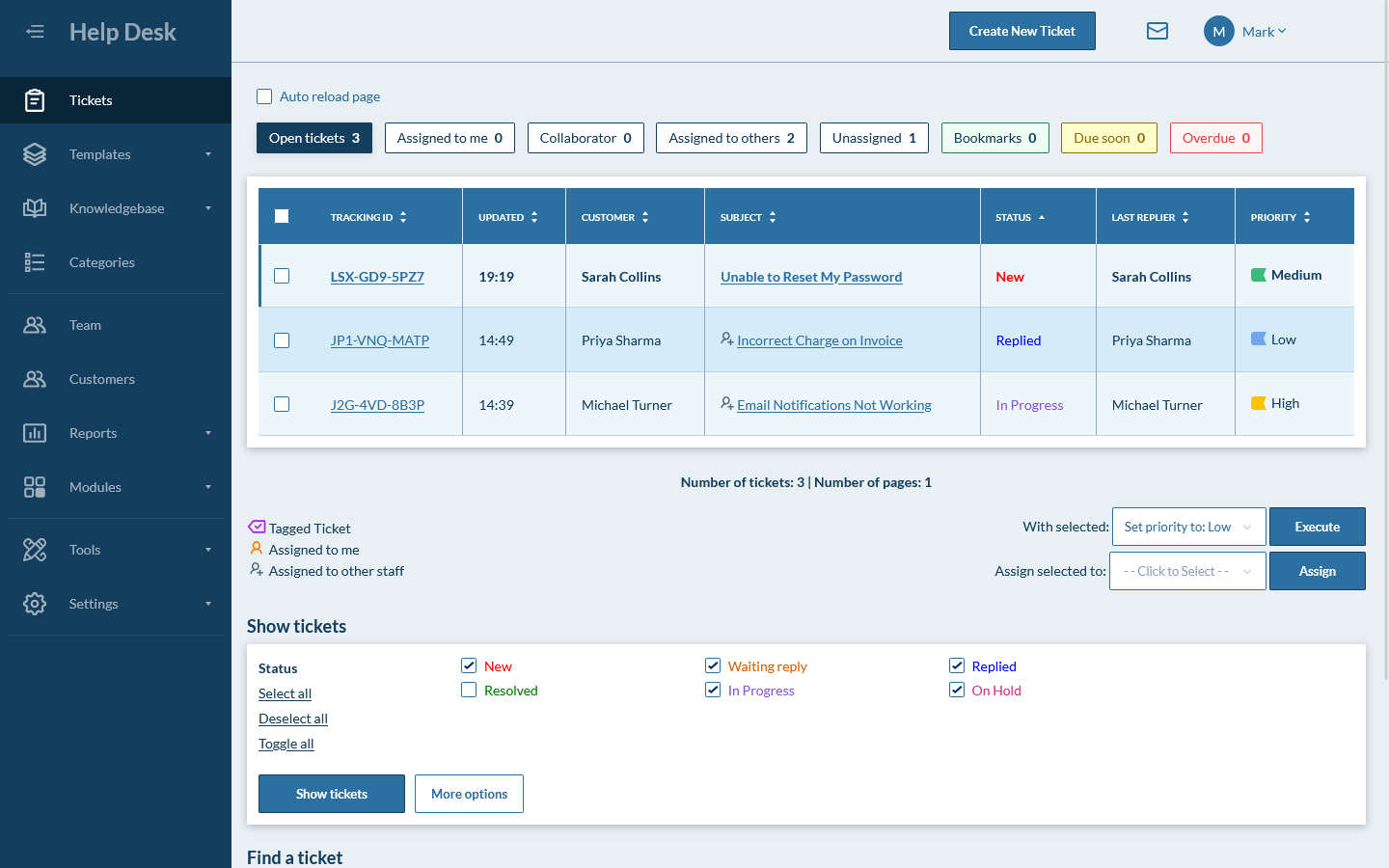
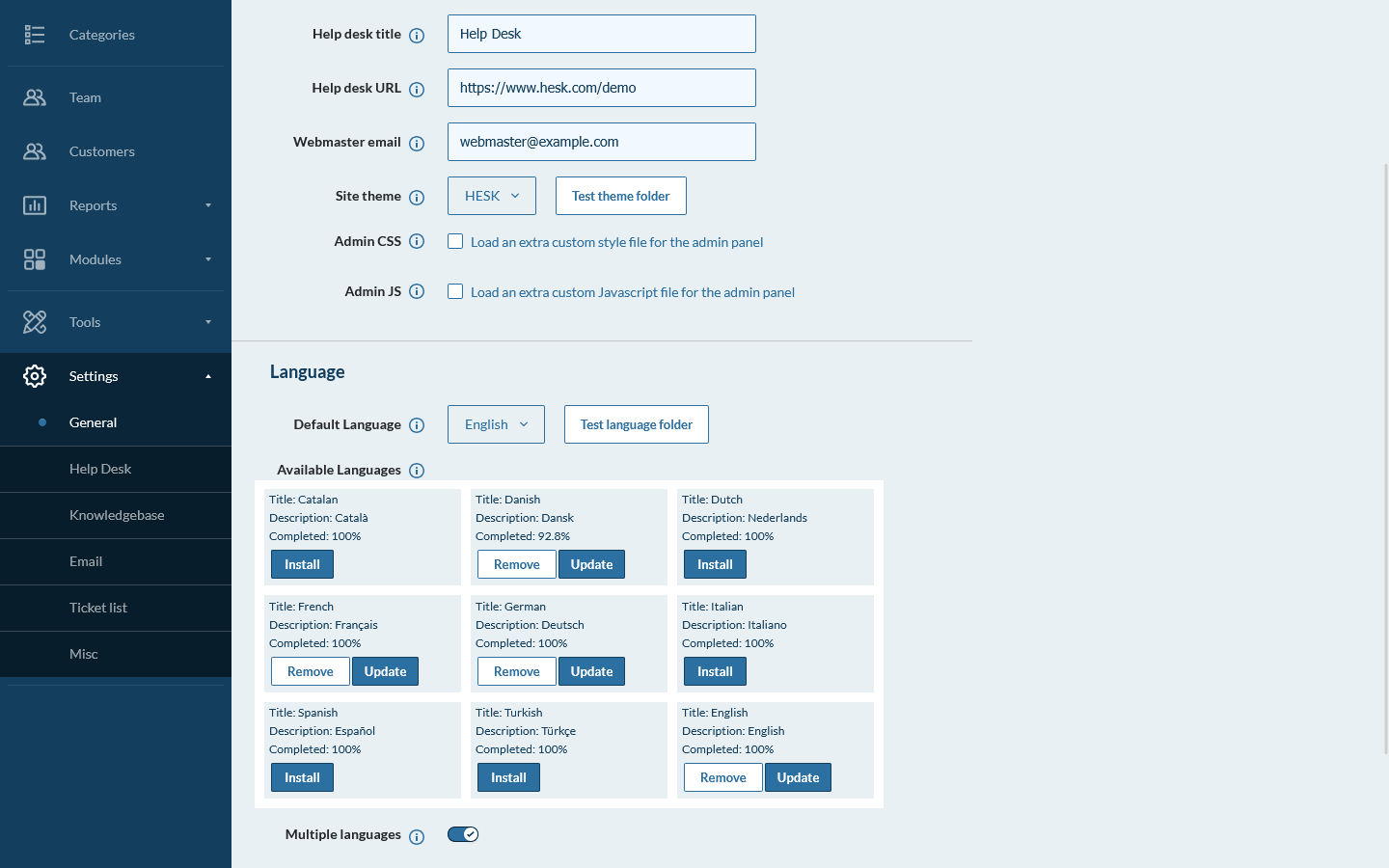
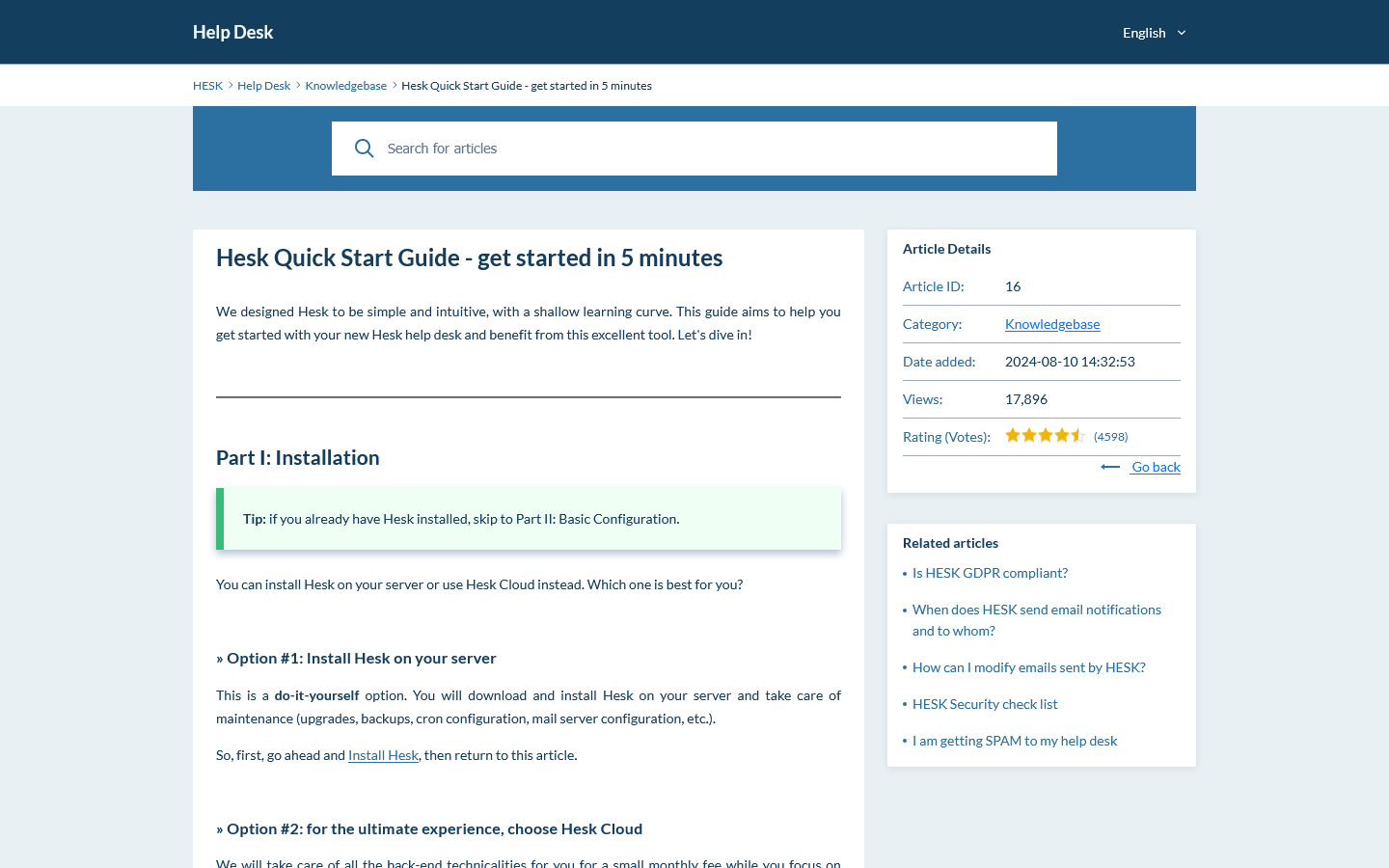
Preview the ticket queue, settings and customer knowledge base. Then use the live demo to test filters, forms and staff permissions.

HubSpot Service Hub vs Hesk questions

Answers to common questions about pricing, CRM, portals, AI, hosting and migration.

Is Hesk a good HubSpot Service Hub alternative?

Yes, for teams that mainly need a help desk rather than a full CRM platform. Hesk provides email and web ticketing, forms, filters, customer accounts, reports and a knowledge base at a much lower cost. HubSpot is the better choice when support must share one customer record with sales and marketing, or when advanced automation, AI and omnichannel service are central.

Which HubSpot Service Hub plan is closest to Hesk?

Service Hub Professional is the closest comparison for features such as the help desk workspace, knowledge base, customer portal, SLAs, advanced automation and customer feedback. Service Hub Starter is much less expensive but does not include several of those features.

Which costs less, Hesk Cloud or HubSpot Service Hub?

At published list prices, HubSpot Starter can cost less for one paid user. Hesk Cloud uses flat plans and becomes less expensive as more paid seats are added. Temporary HubSpot promotions can change the crossover point. Service Hub Professional is much more expensive because it includes a wider CRM, automation, AI and service platform. Professional also carries a published onboarding fee.

Does HubSpot Service Hub have free tools?

Yes. HubSpot offers free service and CRM tools for up to two users. They include basic ticketing, team email, live chat and simple reporting. Hesk Free runs on your own server without a recurring software fee and does not use a two-user software limit.

Can I self-host Hesk or HubSpot Service Hub?

Hesk can be installed on your own PHP and MySQL server or used through Hesk Cloud. HubSpot Service Hub is a hosted cloud platform and does not offer a self-hosted edition.

Which is better if we already use HubSpot CRM?

HubSpot Service Hub is usually the stronger choice when sales, marketing, service and customer success teams need the same contact, company, deal and activity records. Hesk is a separate help desk and does not try to replace HubSpot CRM.

Which is better for forms and customer portals?

Hesk includes flexible ticket forms, category-specific fields and customer accounts in the core product. HubSpot can build powerful forms and ticket properties, but its customer portal and full help desk workspace require Service Hub Professional or Enterprise.

Which is better for AI and omnichannel support?

HubSpot is stronger. Service Hub Professional and Enterprise support Breeze Customer Agent, AI-assisted workflows, help desk routing and channels such as email, chat, forms, calling, WhatsApp and Facebook Messenger. Hesk is focused on email and web tickets.

Does Hesk integrate with sales and marketing systems?

Hesk is a standalone help desk and does not include a CRM or large integration marketplace. It can be customized, but HubSpot is the clear choice when native sales, marketing, service and customer-success data must work together.

Can I buy official support for self-hosted Hesk?

Yes. Hesk Free can be used on your own server. An optional one-time Hesk License removes Hesk branding and includes one year of official email support for the core software.

Can I migrate from HubSpot Service Hub to Hesk?

There is no public one-click HubSpot importer for Hesk. HubSpot can export ticket records and associations, while conversation content and activities may require separate exports or APIs. Define the records and history you need, test with a copy and keep HubSpot available during the transition.

Official product information used for this comparison

Pricing and features can change. Check the official pages before making a purchase, planning a migration or completing a security review.

Test whether you need Service Hub or simply a help desk

Use the Hesk demo with one real support process. If it covers the work without the CRM platform overhead, you can self-host it or choose managed Hesk Cloud.