Help Scout comparison | Updated August 2026

Help Scout vs Hesk

Looking for a Help Scout alternative? Hesk may suit teams that want a traditional ticket portal, flexible forms, detailed filters and predictable costs. Help Scout is a better choice when its shared inbox, mobile apps, live chat, social channels, AI and integrations are central to the support plan.

  • Free self-hosted option
  • Flat Hesk Cloud pricing
  • Customer accounts included
21+ years Hesk development since 2005
1,000,000+ Hesk downloads reported
Free or Cloud Run Hesk yourself or use Hesk Cloud

Why teams look at Hesk instead of Help Scout

Both products aim to make support easier. They differ most in workflow style, channels, pricing and deployment.

When Help Scout may fit better

Help Scout earns its price when the team uses the broader communication and collaboration tools.

  • Polished shared inbox
  • Native iOS and Android apps
  • Live chat, Instagram, Messenger and WhatsApp
  • AI assistance and a broader app ecosystem
Do not choose on price alone. Help Scout is a capable product with a strong inbox experience. Hesk is the better alternative when its focused ticket workflow and lower ownership cost match the way your team actually works.

Hesk and Help Scout start from different assumptions

Help Scout is managed SaaS. Hesk can be self-hosted or managed by the Hesk team.

Option
Hesk
Help Scout
Start free
Hesk FreeRun Hesk on your own PHP and MySQL server without a recurring software fee. Staff and ticket counts are not tied to a paid user plan.
Help Scout FreeUp to five users, one inbox and one Docs site, with a limit of 100 contacts per month. The free plan also limits tags, saved replies and knowledge base articles, and outgoing email includes Help Scout branding.
Core paid service
Hesk CloudManaged hosting, updates, HTTPS and daily backups. The $299 yearly plan includes up to 10 agents. Larger flat plans include up to 50 or 200 agents.
Help Scout Standard$25 per user per month when billed annually. It includes multiple inboxes, live chat, Instagram, Messenger, WhatsApp, basic workflows, one basic SLA policy and AI Inbox assistance.
Advanced service
Hesk Cloud Pro and MAXHigher staff and storage limits plus cloud-only modules. Pro includes escalations and surveys. MAX also includes recurring tickets. Pricing remains flat within the plan limit.
Help Scout Plus and ProPlus adds advanced workflows, two advanced SLA policies, round-robin routing, custom fields, customer portal, more integrations and internal teams. Pro adds unlimited users with a ten-user minimum and stronger security and scale features.
Self-hosted with support
Hesk LicenseA one-time $49.99 license removes Hesk branding and includes one year of official email support for the core self-hosted software.
No self-hosted editionHelp Scout runs as a hosted service. Its plans include vendor support, mobile apps and managed infrastructure.
The main difference: Help Scout is a polished hosted inbox with more communication channels. Hesk gives you a traditional ticket system, deployment choice and a lower-cost path for teams with several staff accounts.

Help Scout vs Hesk, feature by feature

The products overlap on core support work, but they are designed around different ways of serving customers.

AreaHeskHelp Scout
Core ticketingEmail and web tickets, categories, priorities, custom statuses, assignments, due dates, notes, canned replies, templates, followers, time tracking, attachments and full history.
Strong ticket workflow
Shared inbox conversations, assignments, tags, statuses, saved replies, notes, customer history, collision detection and team collaboration.
Interface and learning curveA focused ticket interface with categories, filters and clear customer-facing ticket records. It works well for teams that prefer a traditional help desk.A polished email-style inbox with strong collaboration. It is especially comfortable for teams that want support to feel like working in a shared mailbox.
Better in Help Scout
Ticket filtering and viewsFilter by category, status, priority, owner, assignment, dates, due status and other criteria. Quick links surface assigned, due-soon and overdue tickets.
Detailed filters in Hesk
Search operators, views, tags, customer properties and custom fields provide strong conversation organization. Some view conditions require Plus or Pro.
Forms and custom fieldsSeveral public and private field types. Fields can be required or optional, reordered, pre-populated and displayed only for selected categories.
Flexible forms in core product
Beacon contact forms and inbox custom fields support structured intake. Custom fields are available on Plus and Pro, with up to ten fields per inbox.
Customer portalCustomer accounts can be disabled, optional or required. Customers can log in, submit, view and reply to tickets and follow their history.
Included in Hesk
A secure customer portal is available on Plus and Pro. Customers use a one-time email code to view and manage conversations. Company-level visibility is also available.
Knowledge baseBuilt-in knowledge base with public, private and draft articles, categories, ratings and article suggestions during ticket submission.Docs provides a polished hosted knowledge base. Plans include different numbers of Docs sites, and extra sites carry an additional monthly cost.
Strong in both
Automation and routingCategory auto-assignment, due dates, overdue notices, auto-close, custom statuses, templates and canned replies. Cloud Pro adds escalation tools.Basic and advanced workflows, round-robin or balanced routing, views and SLA policies provide deeper workflow control on higher plans.
Stronger in Help Scout
AINo built-in AI agent or AI drafting layer. This keeps the product simpler and avoids usage-based AI resolution fees.AI Assist is included across plans. Higher plans add AI Drafts and summaries. AI Answers is billed at $0.75 per successful resolution after the trial period.
Better in Help Scout
Live chat and messagingFocused on email and web ticket support. It does not include native live chat or social messaging.Beacon live chat, proactive Messages, Instagram, Facebook Messenger and WhatsApp are available across different paid-plan features and usage rules.
Better for multi-channel support
Mobile accessResponsive web interface for staff and customers. No native agent app.Native iOS and Android apps are included in all plans.
Better in Help Scout
SLAs and reportingBuilt-in statistics, reports, exports, time tracking, reply ratings and due-date oversight.Standard includes one basic SLA policy. Plus includes two advanced policies and Pro includes unlimited advanced policies. Reporting covers channels, users, companies, happiness and SLAs.
Stronger in Help Scout
Integrations and APIDesigned to be self-contained. Source and templates can be customized, but Hesk does not offer a large app marketplace.Inbox API, Docs API, webhooks, OAuth apps, custom apps and integrations with platforms such as HubSpot, Jira, Salesforce and ecommerce tools.
Stronger in Help Scout
Deployment and data controlRun Hesk on your server or use Hesk Cloud in the US, EU or Australia. Self-hosting gives direct control over infrastructure, database and backups.
More deployment choice
Hosted SaaS only. Help Scout manages the service and infrastructure.
Pricing as the team growsFlat Cloud plans include 10, 50 or 200 agents. Self-hosted Hesk has no per-agent fee.
Better value for many agents
Paid plans charge per user. Standard supports up to 25 users, Plus up to 50, and Pro is unlimited with a ten-user minimum.
Data export and leaving the platformA self-hosted Hesk database can be backed up directly. Hesk Cloud customers can work with the Hesk team on data needs.Report exports omit conversation thread contents. Full conversation and Docs extraction may require the Inbox API and Docs API.
Check migration needs early

Hesk Cloud flat pricing versus Help Scout per-user pricing

Move the slider to compare the smallest Hesk Cloud yearly plan with the lowest Help Scout paid plan that supports the selected team size.

How many support users do you need?

Help Scout Standard supports up to 25 users, Plus up to 50, and Pro is used above 50. The calculator does not include the limited Free plan.

Hesk Cloud yearly$299.00Cloud plan | up to 10 agents
Help Scout Standard yearly$3,000.00$25 per user per month, billed annually

Annual list prices before applicable taxes. This compares base subscriptions only. Features, plan limits, add-ons, AI resolutions and support services differ.

Important: Help Scout Free can be attractive for up to five users, but it is limited to 100 contacts per month. Paid Help Scout plans add channels and workflow features that Hesk does not include, so compare fit as well as price.

When Hesk is the better buy

Hesk works best when the support process is ticket-centered and the team does not need Help Scout as a communication platform.

When Help Scout earns the higher cost

Choose Help Scout when the shared-inbox experience and wider communication tools are important parts of the support operation.

  • Shared inbox collaboration: agents prefer an email-style workspace with polished collision detection and customer context.
  • Live channels: the team needs live chat, Instagram, Messenger, WhatsApp or proactive website messages.
  • Mobile apps: agents regularly work from native iOS or Android applications.
  • AI assistance: drafting, summaries or automated answers have a clear business case.
  • Integrations: HubSpot, Salesforce, Jira or ecommerce data should appear inside the support workflow.
  • Advanced SLA and routing: higher-tier policies and routing are worth the subscription cost.
A useful test: if most of the value comes from email tickets, forms, filters and a knowledge base, Hesk deserves a serious trial. If the value comes from chat, social channels, AI and integrations, Help Scout is likely the better fit.

Hesk is not the right choice for every team

Check the requirements below before choosing a smaller and more focused product.

Test Hesk carefully when

  • Native iOS and Android apps are required for daily agent work.
  • Live chat, Instagram, Messenger or WhatsApp must be handled in the same inbox.
  • AI drafting, summarization or automated answer resolution is part of the support strategy.
  • Advanced SLA policies, balanced routing or workflow automation are firm requirements.
  • The support team depends on a large catalog of ready-made integrations.

If several items in the first list apply, Help Scout is probably worth the extra cost.

Think twice about Help Scout when

  • You need a conventional customer ticket portal without buying Plus or Pro.
  • Custom submission fields must vary by category and remain available in the core product.
  • Several staff members need access and per-user pricing creates an outsized bill.
  • You want the option to run the help desk on your own server.
  • The team does not use live chat, social messaging, AI or most marketplace integrations.

Pay for the support model you actually use

Help Scout and Hesk are both easy to understand, but they solve simplicity in different ways.

A polished inbox is always the simplest choice

It can be simple for agents, while billing, plan limits, channels, workflows and AI usage still need administration. Hesk keeps the whole product narrower.

A traditional ticket portal is outdated

Many business, IT and account-support teams still need customers to log in, review ticket history and submit structured information. Hesk is built around that workflow.

The free plan settles the cost question

Help Scout Free can be useful, but it is limited to 100 contacts per month and other caps. Growing teams should compare the paid plan they will actually need.

Every support team needs live chat and AI

Those tools can be valuable, but they also introduce staffing, training and usage costs. Some teams get better results from clearer forms, saved replies and a good knowledge base.

What should different teams choose?

The best answer depends on team size, customer channels and the style of support your customers expect.

One-person support desk

Compare both free options. Help Scout Free removes hosting work but has a 100-contact monthly limit. Hesk Free has no software subscription but requires your own server.

Five-person business support team

Hesk is likely the better value. It provides customer accounts, forms, filters and a knowledge base without five paid user subscriptions.

Team with live chat and social support

Choose Help Scout. Beacon, Instagram, Messenger and WhatsApp are areas Hesk does not try to replace.

B2B team needing company-level portal access

Review Help Scout Plus or Pro. Its customer portal can show company conversations to approved users. Hesk provides customer accounts and ticket tracking, but not the same company-level portal model.

Internal IT or operations desk

Start with Hesk. Structured forms, private fields, categories, permissions and due-date filters often matter more than chat and social channels.

Product company with many integrations

Help Scout may be the safer choice. Its APIs and ready-made integrations reduce custom work when customer data must flow across several systems.

Hesk gives you a path away from per-user SaaS pricing

Help Scout is managed SaaS. Hesk lets you choose between self-hosting and managed Hesk Cloud. Self-hosting can lower software costs, but it also creates operational work.

  • Provide and secure PHP and MySQL hosting
  • Install Hesk and apply updates
  • Configure SMTP, IMAP, POP3 or email piping
  • Set up OAuth for Microsoft 365 or Google where required
  • Run scheduled jobs and monitor them
  • Create backups and test restoration
  • Investigate mail delivery, attachments and server limits

Test Hesk before moving your Help Scout inbox

Use one inbox or support queue first. Confirm that the ticket workflow fits before spending time on historical migration.

List the features in use

Record inboxes, tags, workflows, custom fields, Docs sites, Beacon settings, channels, reports and integrations. Separate active features from old configuration.

Build a Hesk pilot

Create matching categories, forms, permissions, customer accounts and ticket views. Test email import, assignments, replies, attachments, due dates and notifications.

Plan the data export

Help Scout report exports do not include conversation threads. Determine whether the Inbox API, Docs API or a migration service is needed for conversations, customers, articles and attachments.

Run a controlled cutover

Contact Hesk with the data volume and retention requirements. Keep Help Scout available, switch one mailbox first and verify that new and historical support remain accessible.

Do not assume a CSV report is a full backup. Confirm exactly where conversation threads, attachments, customer records and Docs articles will come from before setting a cutover date.

See whether Hesk covers your daily work

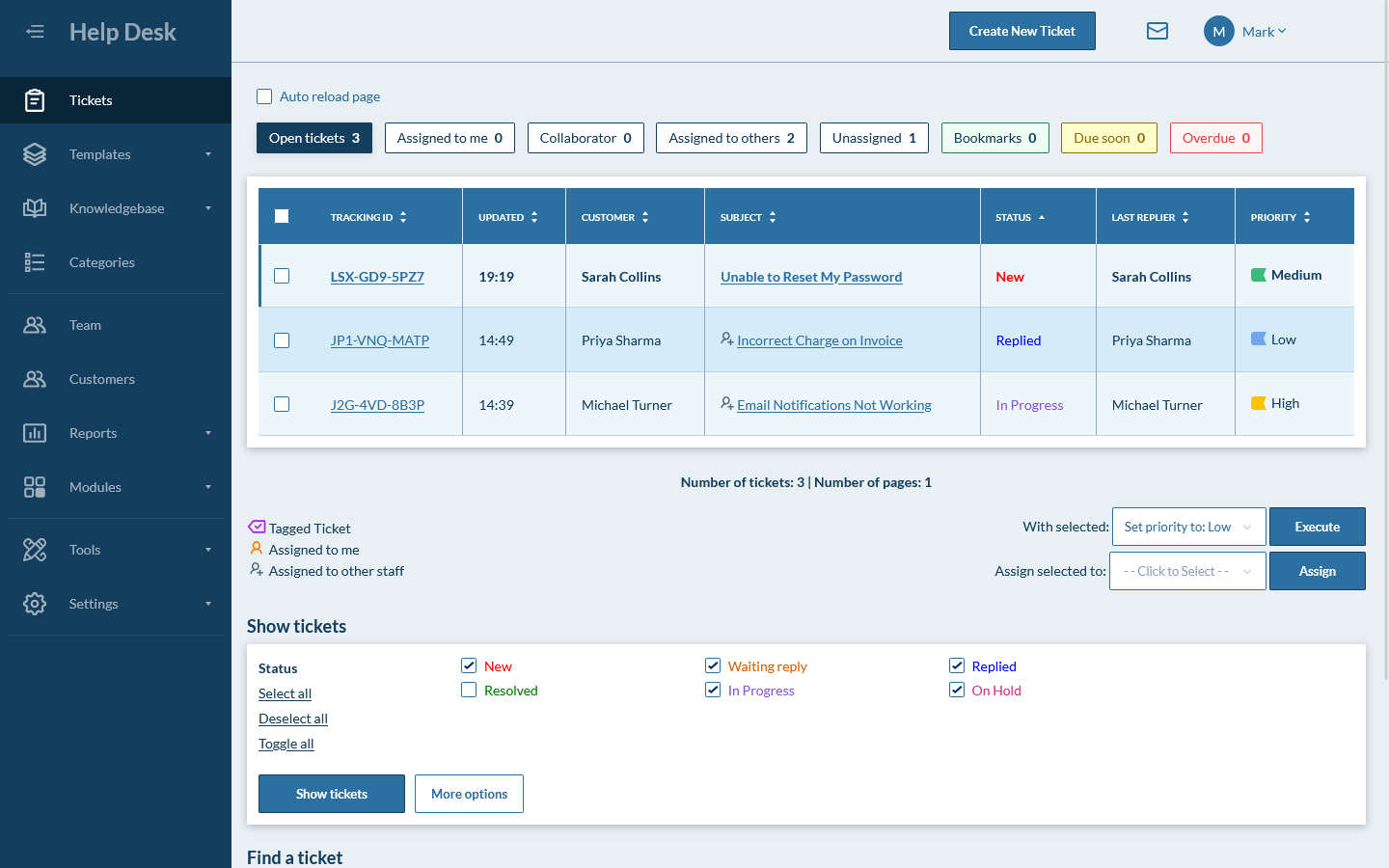
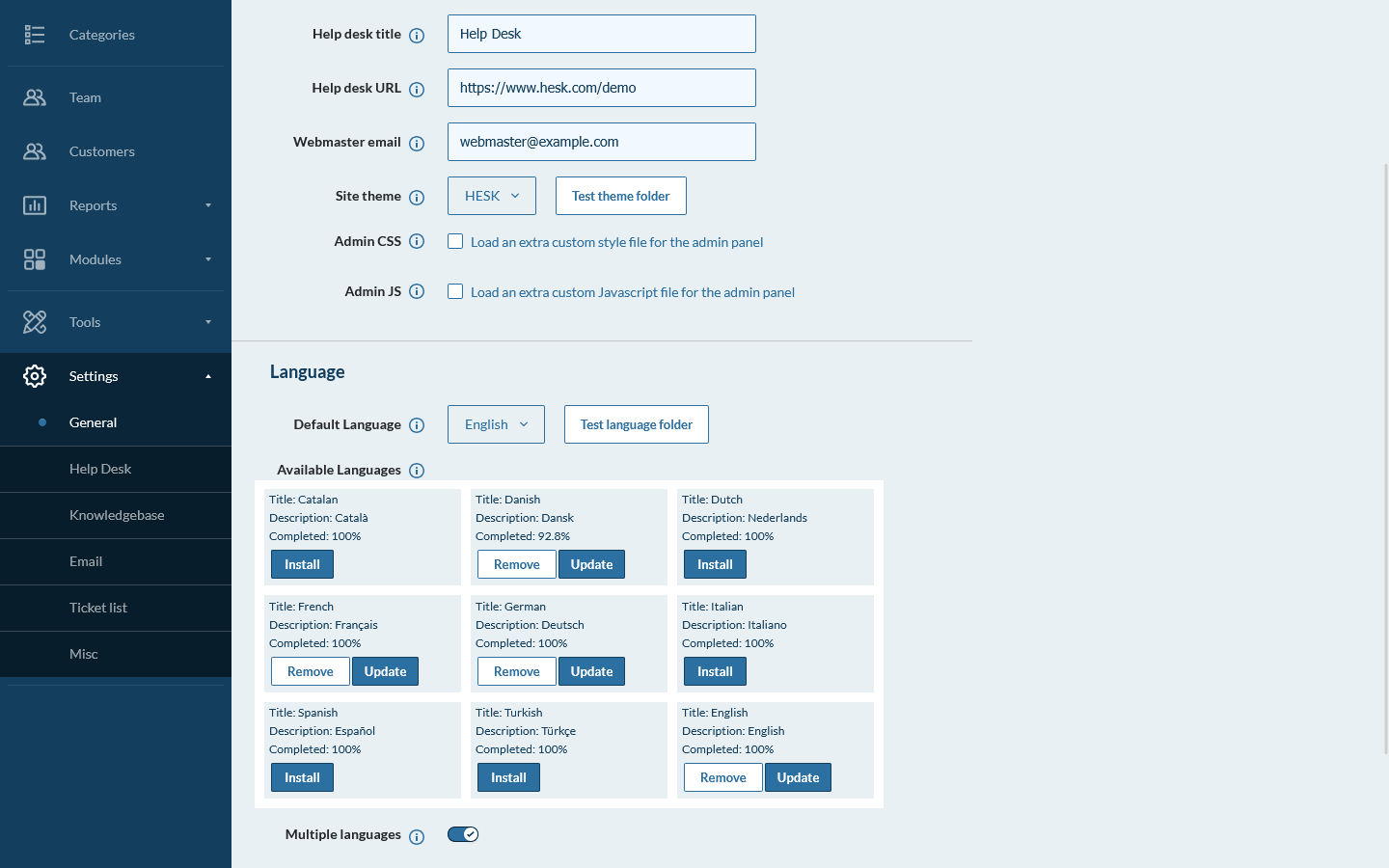
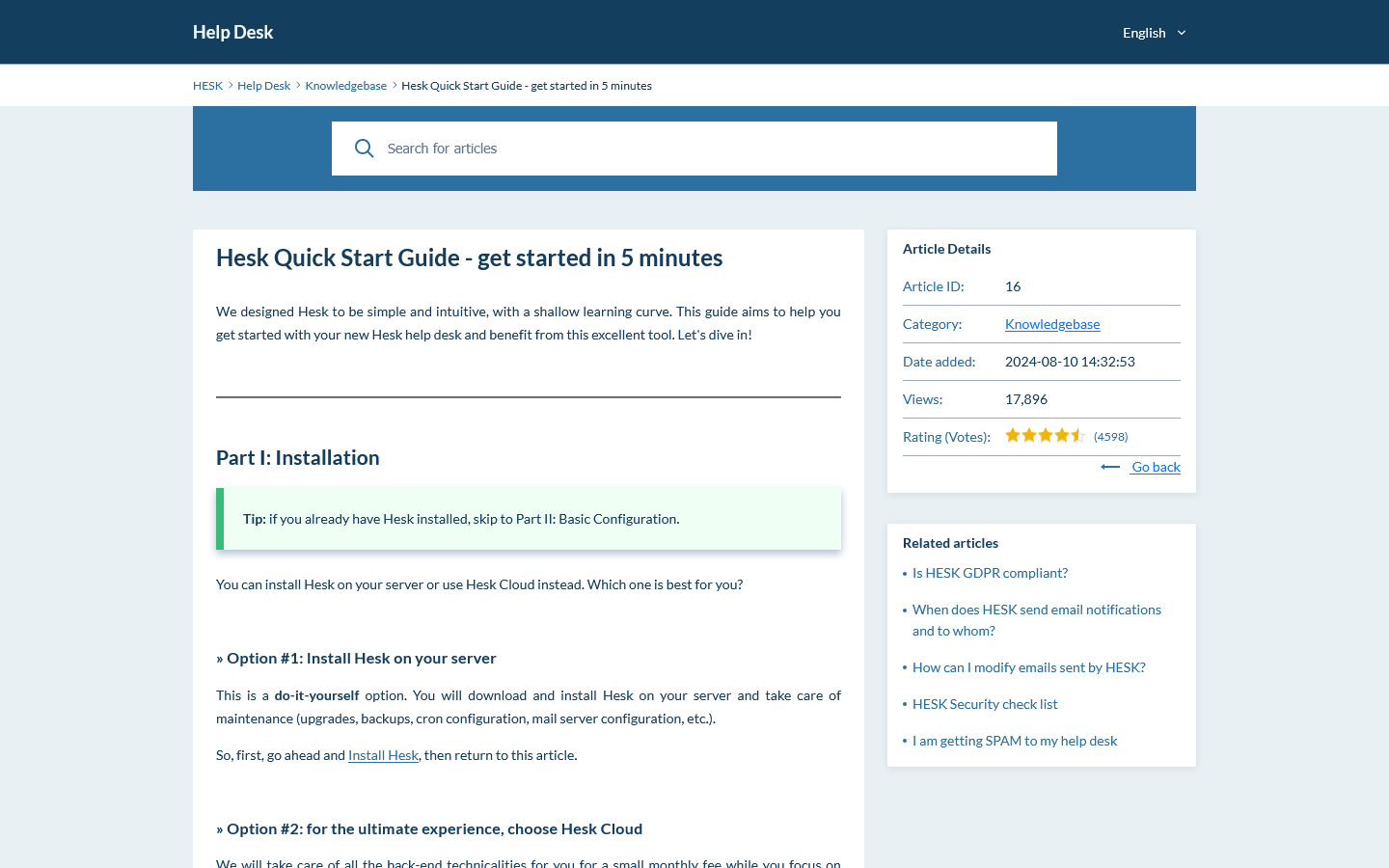
Preview the ticket queue, settings and customer knowledge base. Then use the live demo to test filters, forms and staff permissions.

Help Scout vs Hesk questions

Answers to common questions about pricing, portals, forms, AI, channels, hosting and migration.

Is Hesk a good Help Scout alternative?

Yes. Hesk is a good Help Scout alternative for teams that want traditional ticket management, flexible submission forms, detailed filters, customer accounts, a knowledge base and predictable pricing. Help Scout is the stronger choice when a polished shared inbox, native mobile apps, live chat, social messaging, AI and a larger integration ecosystem are more important.

Which costs less, Hesk Cloud or Help Scout?

Help Scout paid plans are priced per user. Hesk Cloud uses flat plans for up to 10, 50 or 200 agents. At current annual list prices, the base Hesk Cloud plan is slightly less than one Help Scout Standard user and becomes much less expensive as more staff need access. Help Scout also has a free plan with limits on contacts, inboxes, articles and branding.

Does Help Scout have a free plan?

Yes. Help Scout Free supports up to five users, one shared inbox and one Docs site, but it is limited to 100 contacts per month and includes other usage and branding limits. Hesk Free can be used on your own server without a recurring software fee, but you are responsible for hosting and maintenance.

Can I self-host Hesk or Help Scout?

Hesk can be installed on your own PHP and MySQL server, or you can use managed Hesk Cloud. Help Scout is a hosted service and does not offer a self-hosted edition.

Which is better for a traditional customer ticket portal?

Hesk includes customer accounts and ticket tracking in the core product. Help Scout now offers a secure customer portal, but it is available on Plus and Pro plans. Help Scout also uses Beacon and Docs for self-service and new conversations.

Which is better for forms and custom fields?

Hesk supports several public and private custom field types, category-specific fields, required or optional fields, ordering and pre-population. Help Scout custom fields are useful for conversation classification and reporting, but they are limited to Plus and Pro plans and each inbox can have up to ten custom fields.

Does Hesk have live chat, social messaging or AI?

Hesk focuses on email and web ticket support and does not include native live chat, Instagram, Messenger, WhatsApp or an AI answer bot. Help Scout supports those channels and offers AI Assist, AI Drafts and AI Answers across different plans and usage models.

Which is better for mobile support teams?

Help Scout is stronger for mobile work because it has native iOS and Android apps. Hesk works in a mobile browser but does not provide native agent apps.

Which is better for automation and SLAs?

Help Scout has stronger workflow and SLA tools. Standard includes basic workflows and one basic SLA policy, while Plus and Pro add advanced workflows, routing and more SLA policies. Hesk covers common workflows with categories, assignments, due dates, statuses, notices and Hesk Cloud escalation tools.

Can I buy official support for self-hosted Hesk?

Yes. Hesk Free can be used on your own server. An optional one-time Hesk License removes Hesk branding and includes one year of official email support for the core software.

Can I migrate from Help Scout to Hesk?

There is no public one-click Help Scout importer for Hesk. Help Scout report exports do not include conversation thread contents, while fuller exports may require the Inbox API and Docs API. Contact Hesk before switching, confirm what ticket history and attachments must be retained, and test the process with a copy of the data.

Official product information used for this comparison

Pricing and features can change. Check the official pages before making a purchase, planning a migration or completing a security review.

Try Hesk with your own support process

Use the live demo to test your forms, filters and customer ticket workflow. You can then run Hesk on your server, add official support, or choose managed Hesk Cloud.